Voice Pilot: driving any website by voice, without letting the LLM click
A push-to-talk command bar for any website where an LLM plans in plain words and Jev, a closed-choice decision model, picks the on-screen element - ~400ms per command and zero wrong clicks across two real-site evals.
Two clients asked to implement it after seeing the demo - a company that builds technology projects for governments, and one that provides AI-guided user journeys. It showed how fast the Webfuse Automation API can be put to work with a hybrid of decision models and LLMs.
Built on Webfuse. Voice Pilot is an extension that lets you drive any website by saying what you want: "open the comments on the third story", "add the small desk to my cart", "what is this page about?". Hold Option or the mic button, speak, release. A floating command bar docked at the bottom of the session shows what it heard and what it did, and every action runs on the live page through the Webfuse Automation API. It's an internal R&D reference build, not client work.
The problem
The obvious way to build a browser agent is to let an LLM read the DOM and emit a selector or an action, then execute it. That design fails on three axes at once.
- Latency. A voice command has to feel like a command, not a chat turn. Frontier chat models measured 4-6 seconds per call through our gateway. Multiply that by a multi-step task and the user has stopped waiting.
- Invented targets. A model that generates selectors or element ids can invent ones that don't exist, or pick an element that is off-screen or hidden under a banner. On a real site every wrong click is a real side effect - an item in the cart, an upvote, a hidden story.
- Speech errors compound. "Add the MICKE desk" comes back from speech recognition as "Mickey desk" or "my car". Generic transcription has no idea which proper nouns are on the screen.
The root cause is one design decision. The naive agent asks a single generative model to do two different jobs: planning (what does the user want?) and grounding (which exact element is that?). Grounding is where open-ended generation is both slow and unsafe. No prompt fixes that, because the model is still free to write any answer.
The design
So I split the work by what each kind of model is actually good at.
Grounding is a classification problem, not a generation problem. Every command goes through one call to Jev, a decision-making model from typesafe.ai. Jev is a decisions API, not a chat API - the same category as OpenAI's Decisions API. It doesn't generate text. It picks from fixed option lists and returns a probability for each option. One call asks three questions at once: what kind of action, which on-screen element, and which scroll direction. The list of targets is the screen.
export function buildQuestions(elements: El[]): Record<string, Question> {
  const criteria: Record<string, string> = { none: "No element needed" };
  for (const e of elements) criteria[e.id] = optionText(e);
  return {
    action: { type: "choice", instructions: "What kind of browser action does the user's command ask for?", criteria: ACTIONS },
    target: { type: "choice", instructions: "Which on-screen element does the user's command refer to? Choose none if no element is needed.", criteria },
    direction: { type: "choice", instructions: "If the user wants to scroll, which direction?", criteria: { down: "Down / further / more", up: "Up / back to the top" } },
  };
}
Because the target is chosen from a list built from the live DOM, it cannot pick an element that doesn't exist. The call takes about 400ms, costs a fraction of a cent, and is deterministic: the same page and the same words give the same answer.
The scan defines what "on screen" means, and that is most of the quality. The content script collects interactive elements, including inside shadow DOM, that are in the viewport, not hidden, and not covered by an overlay. Each one gets a label (from aria attributes, form labels, inner text or tooltips), the text of the item it belongs to (the product card around "Add to cart", the story row around "hide"), and an ordinal when labels repeat - "hide #3 of 30" - so "the third one" resolves. The overlay check is a single probe at the element's centre:
function visible(el: Element): boolean {
  const r = el.getBoundingClientRect();
  if (r.width < 2 || r.height < 2 || r.bottom <= 0 || r.right <= 0 || r.top >= innerHeight || r.left >= innerWidth) return false;
  /* ... computed style checks ... */
  // Covered by an overlay? Probe the visible part of the element.
  const x = Math.min(Math.max(r.left + r.width / 2, 1), innerWidth - 1);
  const y = Math.min(Math.max(r.top + r.height / 2, 1), innerHeight - 1);
  const root = el.getRootNode() as Document | ShadowRoot;
  const hit = root.elementFromPoint?.(x, y);
  return !hit || hit === el || el.contains(hit) || hit.contains(el);
}
A cookie banner therefore hides what sits under it, exactly as it does for the user. The scan is capped at 200 elements, inside Jev's 255-choice limit, and takes 3-25ms.
Confidence gates action - unsure means ask. In a grounding probe, correct target picks averaged 0.81 confidence and wrong ones 0.46. So below 0.5 the bar doesn't click. It shows the top three candidates and asks "did you mean...". There is also a consistency rule: action and target are judged independently, so a confident target paired with a shaky "reason" or "do nothing" usually means the user did name something to click.
// Below this, a target pick was wrong more often than right in the probe
// (right picks averaged 0.81, wrong ones 0.46).
export const CONFIRM_BELOW = 0.5;
/* ... */
  // Action and target are judged independently. A confident target with a
  // shaky "reason"/"noop" usually means the user did name a thing to click.
  if ((action === "reason" || action === "noop") && targetId && t.confidence >= 0.6 && a.confidence < 0.6) action = "click";
/* ... */
  const confirm = needsTarget && (!targetId || t.confidence < CONFIRM_BELOW || (action === "type" && !text));
The LLM plans in words; Jev grounds every step. When a command is classified as needing reasoning - a question, or a multi-step task like "sort by cheapest" - an LLM loop takes over. It sees the scanned elements plus up to 5K characters of page text, and replies with exactly one JSON object: an answer, a done signal, or one step in plain words, like click "Sort". That step goes back through the same scan, classify and act path as if the user had said it.
async function agent(goal: string, runId: string): Promise<RunResult> {
  /* ... */
  for (let n = 1; n <= MAX_STEPS; n++) {
    if (cancelled.delete(runId)) return { status: "task", summary: "Stopped.", steps, ms: ms() };
    const page = await scan(6000);
    const reply = await think(buildMessages(goal, page, steps));
    /* ... */
    if (reply.kind === "answer") return { status: "answer", answer: reply.answer, steps, ms: ms() };
    if (reply.kind === "done") return { status: "task", summary: reply.summary, steps, ms: ms() };

    const result = await step(reply.command, page); // same scan -> Jev -> act path as a user command
    const { outcome, ok } = outcomeOf(result);
    steps.push({ command: reply.command, outcome });
    /* ... */
  }
}
The LLM never sees element ids and never writes a selector. Every click is still a real, visible element picked by Jev. Two judgment calls follow from that split:
- Pick the planner for speed, not grounding skill. Because the planner no longer has to find elements, the fastest model on our gateway was good enough - 0.5-1 second per step, against 4-6 seconds for frontier chat models. The split is what made the fast model viable.
- Parse only the first complete JSON object. Models sometimes keep going and narrate imagined future steps ("the page updated to..."). Those must never be treated as the plan. The loop also stops at 8 steps, shows a live step list, and has a Stop button.
Voice is push-to-talk, biased by the screen. Speech runs on OpenAI's realtime transcription model, gpt-live-transcribe, over WebRTC, with a short-lived key minted by a backend Worker. The model has no end-of-speech detection, so releasing the key commits the audio buffer after a 250ms tail. On every press, the current on-screen labels are sent as the transcription prompt. That vocabulary bias is what turns "Mickey desk" into "MICKE desk".
// popup.ts - on every press
  // Bias recognition toward what's on screen ("MICKE", not "Mickey").
  const vocab = (await browser.runtime.sendMessage({ type: "vp/vocab" } satisfies Msg).catch(() => null)) as { labels: string[] } | null;
  if (!held) return; // released while we were scanning
  await voice.start(vocab?.labels?.length ? vocabularyFrom(vocab.labels) : undefined);
The connection opens on the first press and stays warm. Between presses the mic track is disabled and the buffer cleared, so nothing said outside a press is transcribed. Presses under 300ms are treated as accidental.
The plumbing is shaped by the platform. Webfuse extensions run in three contexts, and each job sits in the one context that can do it. Network calls live in the popup and background, because only those contexts get host permissions. Clicks live in the content script, because it can pass live element references to the Automation API. Model calls go through a backend Worker, because the gateway sends no CORS headers and its key must stay server-side. "Go back" uses the extension's own page history and relocates the session, because history.back() inside a proxied tab often lands on an invisible entry first and had to be said twice.
The tradeoffs I accepted:
- Viewport-only scan. It can't click what's below the fold until you scroll. The agent learns to scroll, and it gets the full page text for questions.
- Typed text comes from the command, not a model. A decisions model can't produce strings, so text to type is pulled from quotes or a leading verb ("search for X"). That limits phrasing, but it never invents input.
- One extra network hop through the Worker per call, to keep keys server-side.
Results
- Two clients asked to implement it after the demo: a company that builds technology projects for governments, and one that provides AI-guided user journeys. The demo showed how quickly the Webfuse Automation API can be put to work when decision models and LLMs each do the part they're good at.
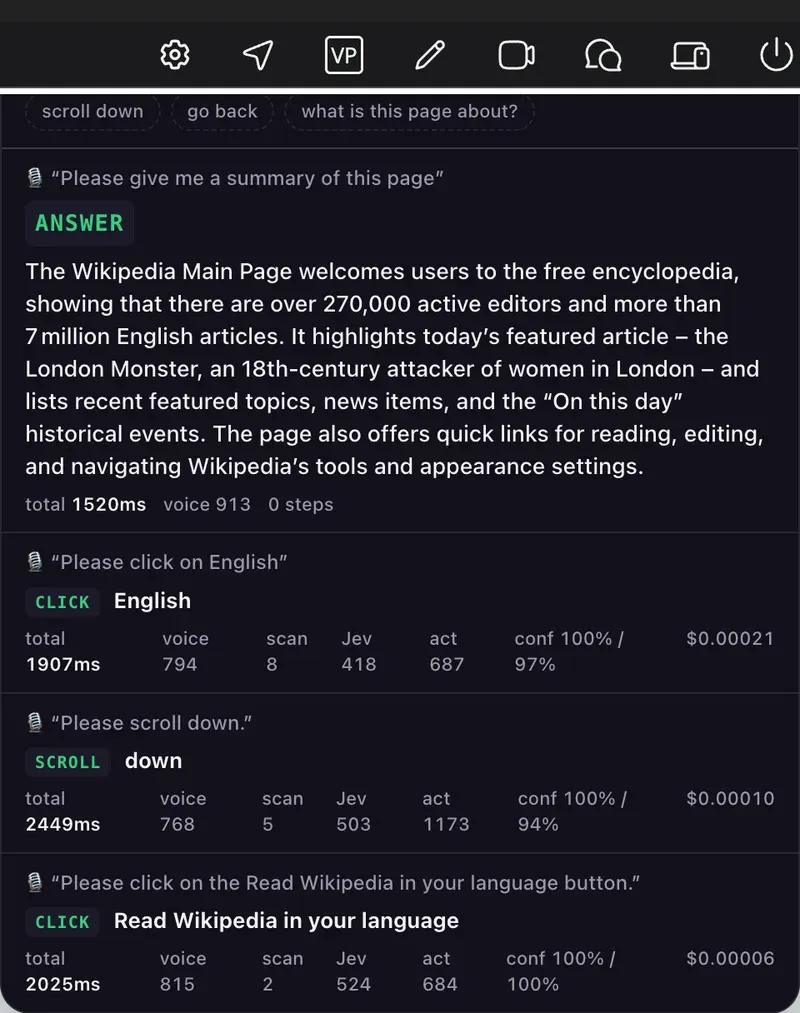
- End to end: 1.9-2.4 seconds from releasing the key to a completed action, in the session pictured above - roughly 0.8s of speech recognition, 0.4-0.5s for Jev, under 10ms to scan the page, and the rest carrying out the click or scroll. A spoken question ("give me a summary of this page") was answered in 1.5 seconds.
- Jev decision latency: ~400-450ms per command, flat, at $0.0001-0.0003 per command.
- Page scan: 3-25ms, up to 200 elements.
- Grounding confidence: 0.81 average for right picks vs 0.46 for wrong ones, which set the 0.5 ask-instead-of-act threshold. Labels quoted by the LLM planner grounded at 0.85-0.99.
- Planner: 0.5-1 second per step, against 4-6 seconds for frontier chat models.
- Voice: final transcript ~0.7-1.0 seconds after release; the first press connects in ~1.7-2.5 seconds, then stays warm.
- Eval on two real sites, zero wrong clicks:
- Hacker News (160 on-screen elements): 8/8 correct across upvote, open story N, comments, hide, navigation, scroll and a question. A garbled command asked for confirmation - with the right top candidate.
- A large furniture retailer's search page (57 visible elements): 6/8 acted correctly. "Save the first desk" asked instead of acting, again with the right top pick, and "cheapest" was correctly routed to the planner.
- 19 unit tests passing across the decision logic, the agent loop and page history.
The principle
Let the generative model decide what to do, in words, and let a closed-choice decision model decide which thing on screen that is. You get speed, determinism and zero invented targets - and the confidence score tells you when to ask instead of act.